Data, performance & quality
Import and export to Excel / CSV / JSON, a live performance monitor, code metrics, documentation from source and RPGUnit tests — new in 1.1.
Import and export table data
Export: right-click a file → Export Table Data, pick Excel (.xlsx), CSV or JSON and optionally a WHERE condition. In a .sql editor, Export Query Result exports the result of the statement under the cursor. At most vanthrex.export.maxRows rows (100,000 by default).
Import: right-click a file → Import CSV or Excel into Table, pick the file, then add or replace. The preview shows how the file’s columns map to the table’s (by name, ignoring case and punctuation), the first 20 rows, and the rows that would be skipped and why. Import inserts the rows in batches of 100 (without commitment control) and can be cancelled.
Performance monitor
What it is: Live charts of CPU used, system ASP used, active jobs and temporary storage (hover a chart for the value at each moment), the top jobs by CPU and by disk I/O between two samples, and the memory pools.
How: Jobs view toolbar → Performance Monitor (or the quick menu). Click a job for its job log; Pause stops sampling. The interval is vanthrex.performance.intervalSeconds (5 s by default).
Code metrics and documentation
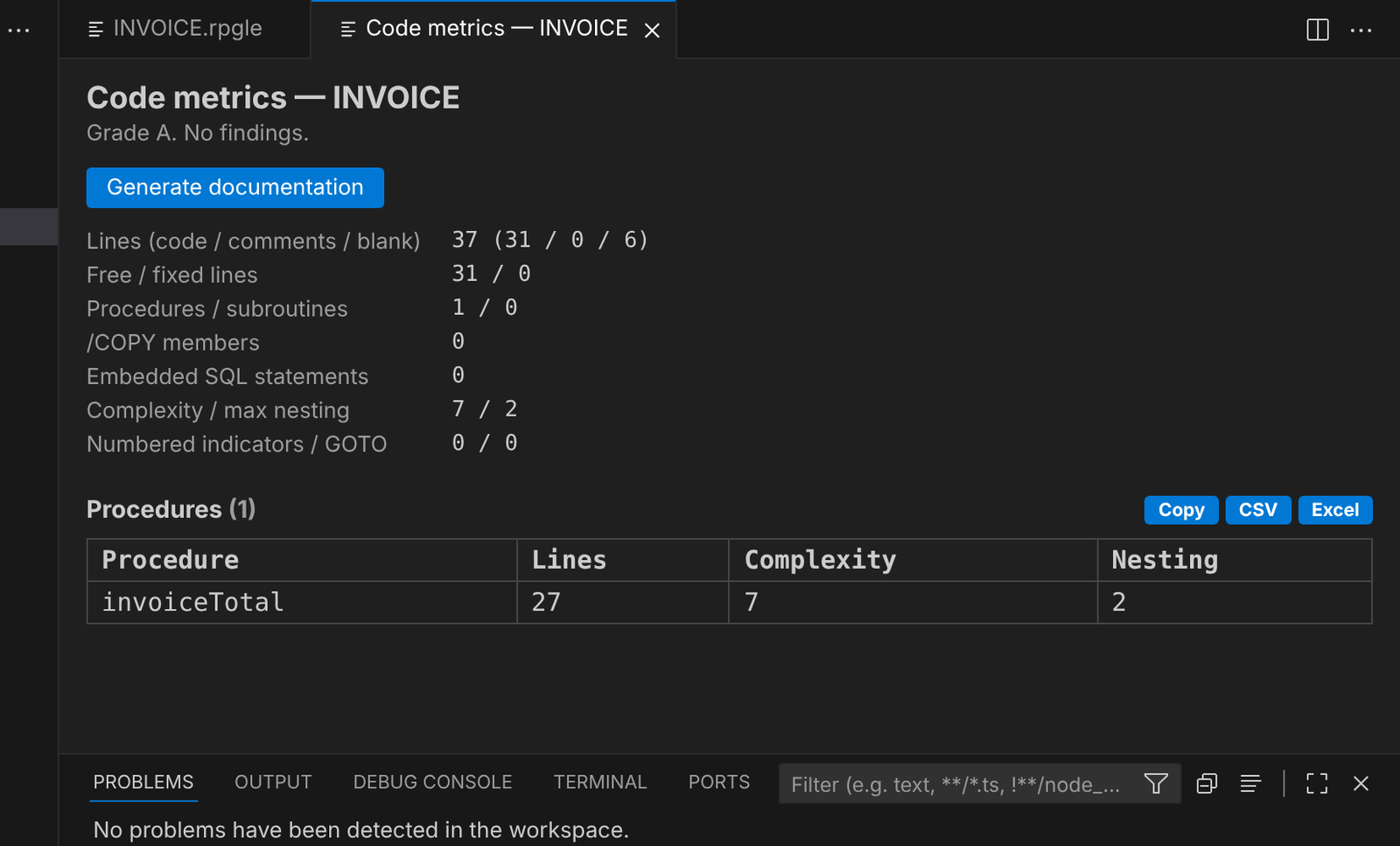 Code metrics of a source: lines, procedures, complexity, nesting, with a grade.
- Code metrics: right-click a source file for every RPG/CL member (up to 300), or use Code Metrics in a member’s editor menu for one source. Per member: code lines, % free form, procedures, subroutines, complexity, nesting, numbered indicators, GOTOs, SQL — and a grade A–D with advice.
- Generate documentation: in an RPG or CL member, Generate Documentation (Markdown) opens a Markdown document with the description (from the leading comments), parameters, files, called programs and procedures, copybooks, the procedures with their comments, and metrics — ready to complete and keep in Git or a wiki.
RPGUnit tests
What it is: Unit tests for RPG with iRPGUnit, run from VS Code’s Testing view.
How: In a member with exported procedures, Generate RPGUnit Tests… creates a test member (T + member name) in the same source file with one test per procedure. Fill in the inputs and expected values, then click ▶ next to the member or a single test in the Testing view: Vanthrex compiles it with RUCRTRPG and runs it with RUCALLTST, and shows each test as passed or failed with the assertion message. Test members (with /include qinclude,TESTCASE) are found when opened, or with Find RPGUnit Tests… on a source file. Settings: vanthrex.rpgunit.library (where RPGUnit is installed, RPGUNIT by default) and vanthrex.rpgunit.testLibrary.