Try it with examples
Copy these small sources into a folder, open the folder in VS Code and see Vanthrex at work — no IBM i connection needed for the checks, suggestions, conversions and diagrams.
- RPG: checks and quick fixes
- RPG: suggestions while you type
- RPG: fixed format to free
- RPG: flowchart and layout
- CL: checks
- CL: Format Document
- SQL: checks before you run
- DDS: checks while you type
- Next
Save each file with the extension shown (
.rpgle,.clle,.sql,.dspf): the extension tells Vanthrex which checks to run. Open Problems withCtrl+Shift+M.
RPG: checks and quick fixes
A free-form program with eight typical mistakes.
Show ORDERS.rpgle
**free
ctl-opt dftactgrp(*no) actgrp(*new) option(*srcstmt: *nodebugio);

dcl-f custmast keyed;

dcl-pr calcTotal packed(11:2);
  qty int(10) const;
  price packed(9:2) const;
end-pr;

dcl-s custNo   packed(7:0);
dcl-s custName char(10);
dcl-s total    packed(5:2);
dcl-s lines    char(3) dim(5);

custName = 'ACME CORPORATION';
total = 1234.5;

chain (custNo) custmast;
dsply custName;

exec sql update orders set status = 'C';

total = calcTotal(3);
lines(6) = 'X';

*inlr = *on;
return;

dcl-proc calcTotal;
  dcl-pi *n packed(11:2);
    qty int(10) const;
    price packed(9:2) const;
  end-pi;

  return qty * price;
end-proc;
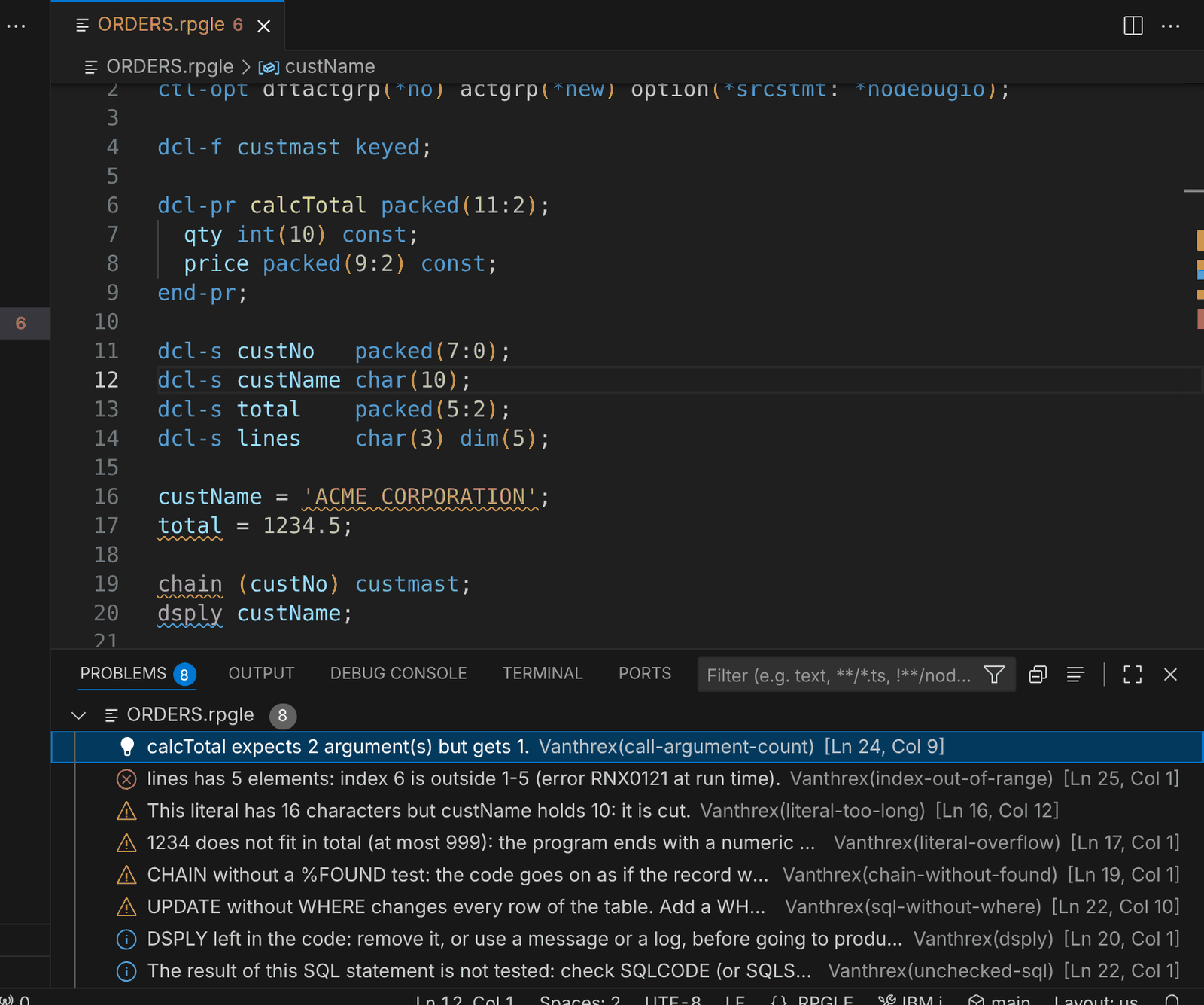 Eight findings in the Problems view, each with its rule name.
What you see: a call with one argument instead of two, an array index out of range, a literal longer than its variable, a numeric overflow, CHAIN without %FOUND, UPDATE without WHERE, a DSPLY left in the code and embedded SQL whose result is not tested. Put the cursor on chain and press Ctrl+.:
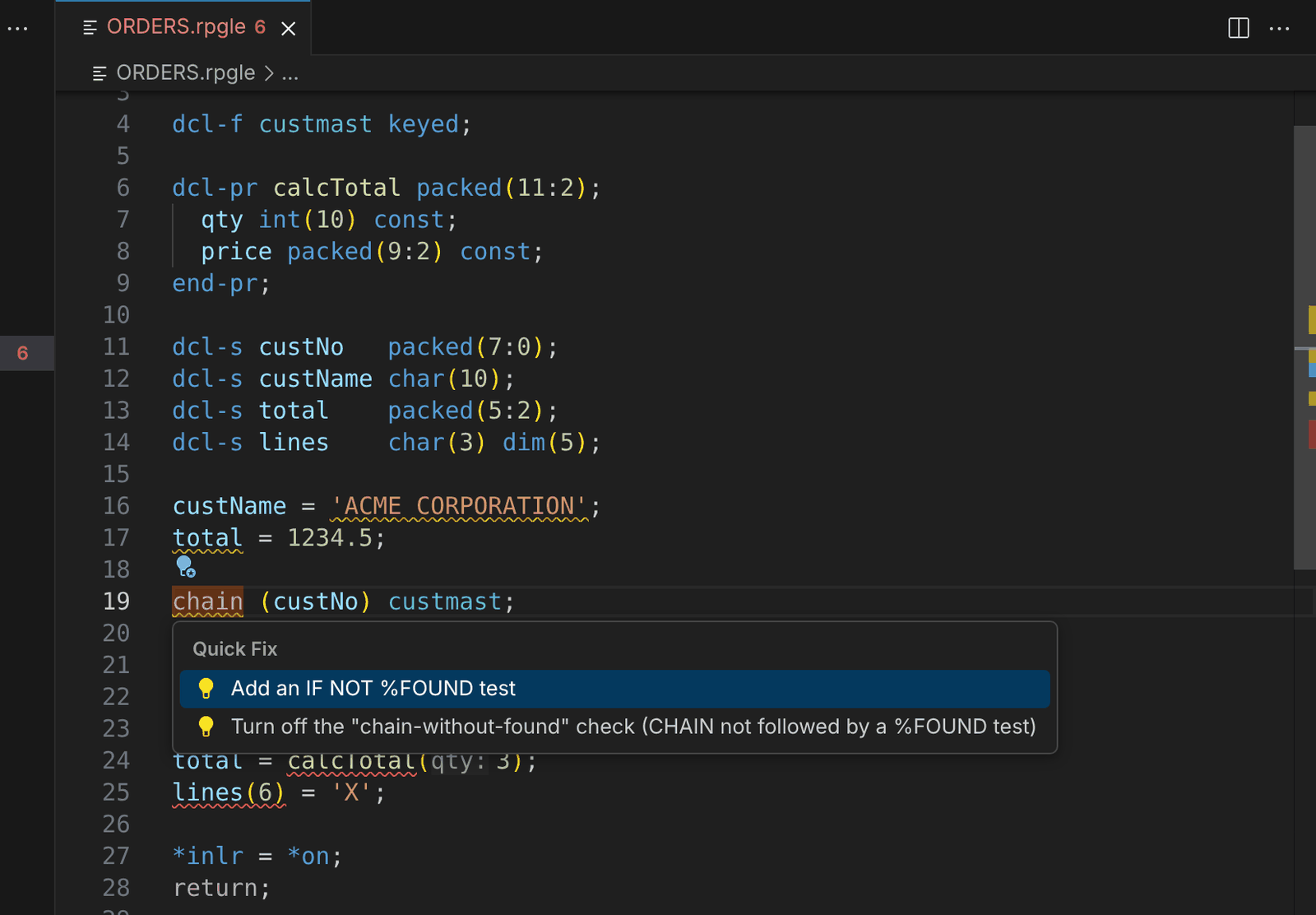 Add an IF NOT %FOUND test writes the missing test for you.
RPG: suggestions while you type
Type the last line yourself: after a CHAIN, Vanthrex proposes the next line in grey.
Show SUGGEST.rpgle
**free
ctl-opt dftactgrp(*no) actgrp(*new);

dcl-f custmast keyed;
dcl-s custNo packed(7:0);
dcl-s orderTotal packed(11:2);

chain (custNo) custmast;
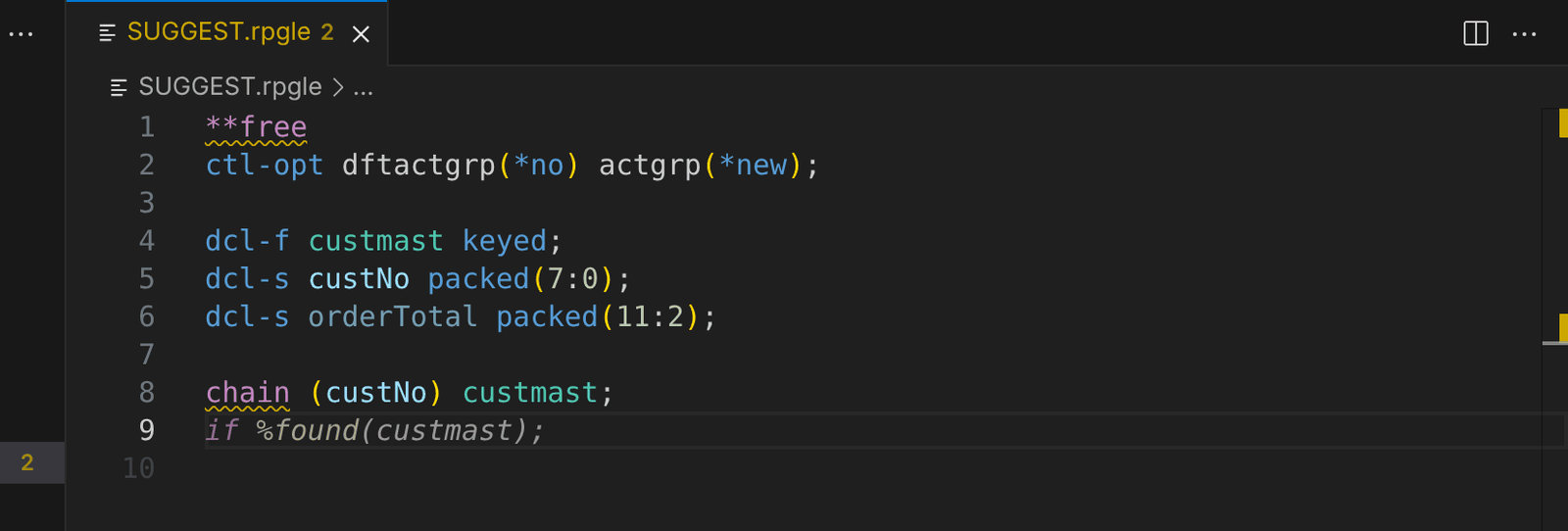 After CHAIN: if %found(custmast); — press Tab to accept.
What you see: suggestions also come after embedded SQL (an SQLCODE test) and, in CL, after CHKOBJ (a MONMSG).
RPG: fixed format to free
A fixed-format program with H, F, D and C specs. Run Convert Fixed Format to Free (H, F, D, P and C Specs) from the command palette.
Show FIXED.rpgle
     H DFTACTGRP(*NO) ACTGRP(*CALLER)
     FCUSTMAST  IF   E           K DISK
     D custNo          S              7P 0
     D total           S              9P 2
     D count           S              5I 0
     C     *ENTRY        PLIST
     C                   PARM                    custNo
     C     custNo        CHAIN     CUSTMAST
     C                   IF        %FOUND(CUSTMAST)
     C                   EVAL      total = total + 1
     C                   ADD       1             count
     C                   ENDIF
     C                   EVAL      *INLR = *ON
     C                   RETURN
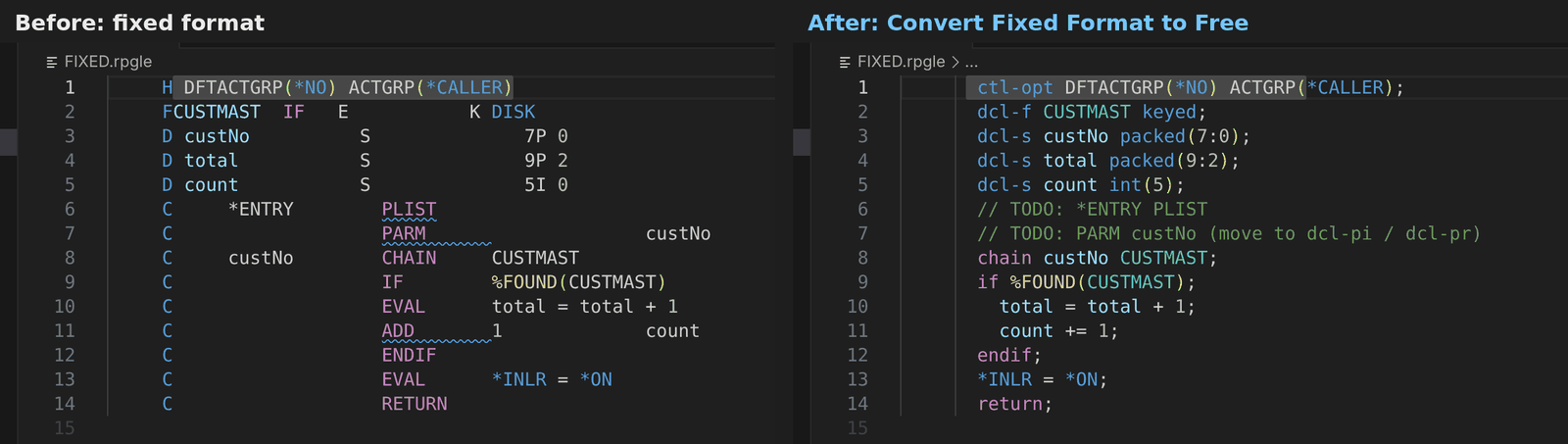 Before and after the conversion.
What you see: every spec becomes free form; what needs a decision from you (here *ENTRY PLIST) is kept as a // TODO comment.
RPG: flowchart and layout
Put the cursor in the procedure and run Flowchart of This Procedure.
Show INVOICE.rpgle
**free
ctl-opt dftactgrp(*no) actgrp(*new);

dcl-f orders keyed usage(*input);

dcl-proc invoiceTotal export;
  dcl-pi *n packed(11:2);
    orderNo packed(9:0) const;
  end-pi;
  dcl-s total packed(11:2) inz(0);
  dcl-s tries int(10) inz(0);

  chain (orderNo) orders;
  if not %found(orders);
    return 0;
  endif;

  dow tries < 3;
    tries += 1;
    select;
      when status = 'O';
        total += amount;
      when status = 'C';
        leave;
      other;
        total = 0;
    endsl;
  enddo;

  monitor;
    total = total * 1.2;
  on-error;
    total = 0;
  endmon;
  return total;
end-proc;
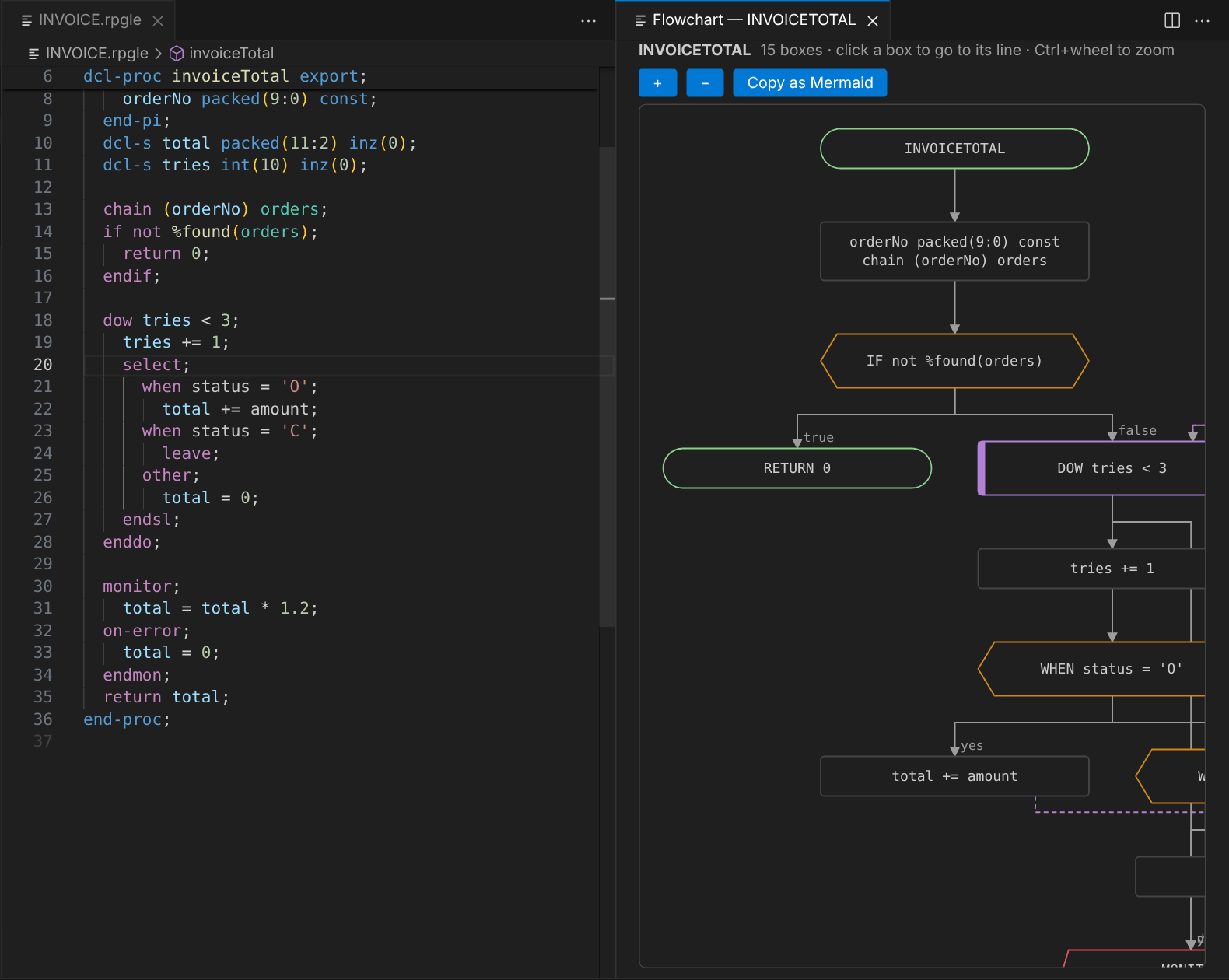 Click a box to go to its line; Copy as Mermaid for your documentation.
What you see: IF, SELECT / WHEN, DOW and MONITOR as boxes with their branches. With a data structure (for example in LAYOUT.rpgle below), Data Structure Layout shows every subfield with its positions:
Show LAYOUT.rpgle
**free
ctl-opt dftactgrp(*no);

dcl-ds order qualified;
  orderNo   packed(9:0);
  custNo    packed(7:0);
  orderDate date;
  status    char(1);
  amount    packed(11:2);
  lines     int(10);
  comment   varchar(50);
end-ds;

order.status = 'O';
*inlr = *on;
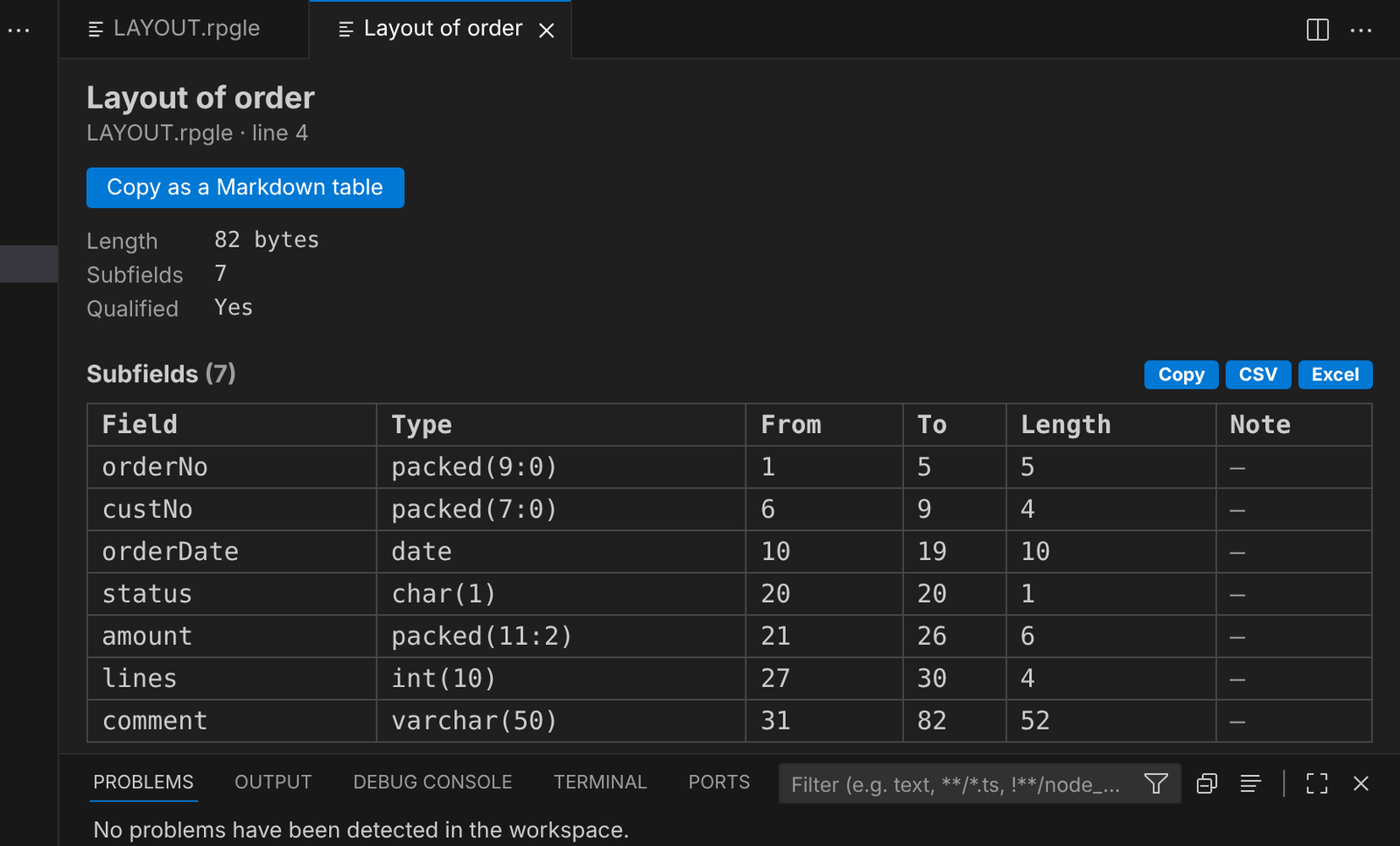 Positions and lengths like the compile listing, without compiling.
CL: checks
A nightly CL program.
Show NIGHTLY.clle
PGM PARM(&LIB)
DCL VAR(&LIB) TYPE(*CHAR) LEN(10)
DCL VAR(&MSG) TYPE(*CHAR) LEN(5)
DCL VAR(&UNUSED) TYPE(*CHAR) LEN(10)
CHGVAR VAR(&MSG) VALUE('Nightly run started')
CHKOBJ OBJ(PRODLIB/ORDERS) OBJTYPE(*FILE)
IF COND(&COUNT *GT 0) THEN(DO)
  GOTO CMDLBL(FINISH)
ENDDO
SNDPGMMSG MSGID(CPF9898) MSGF(QCPFMSG) MSGDTA('Nightly processing finished for all the orders of the day') MSGTYPE(*COMP)
ENDPGM
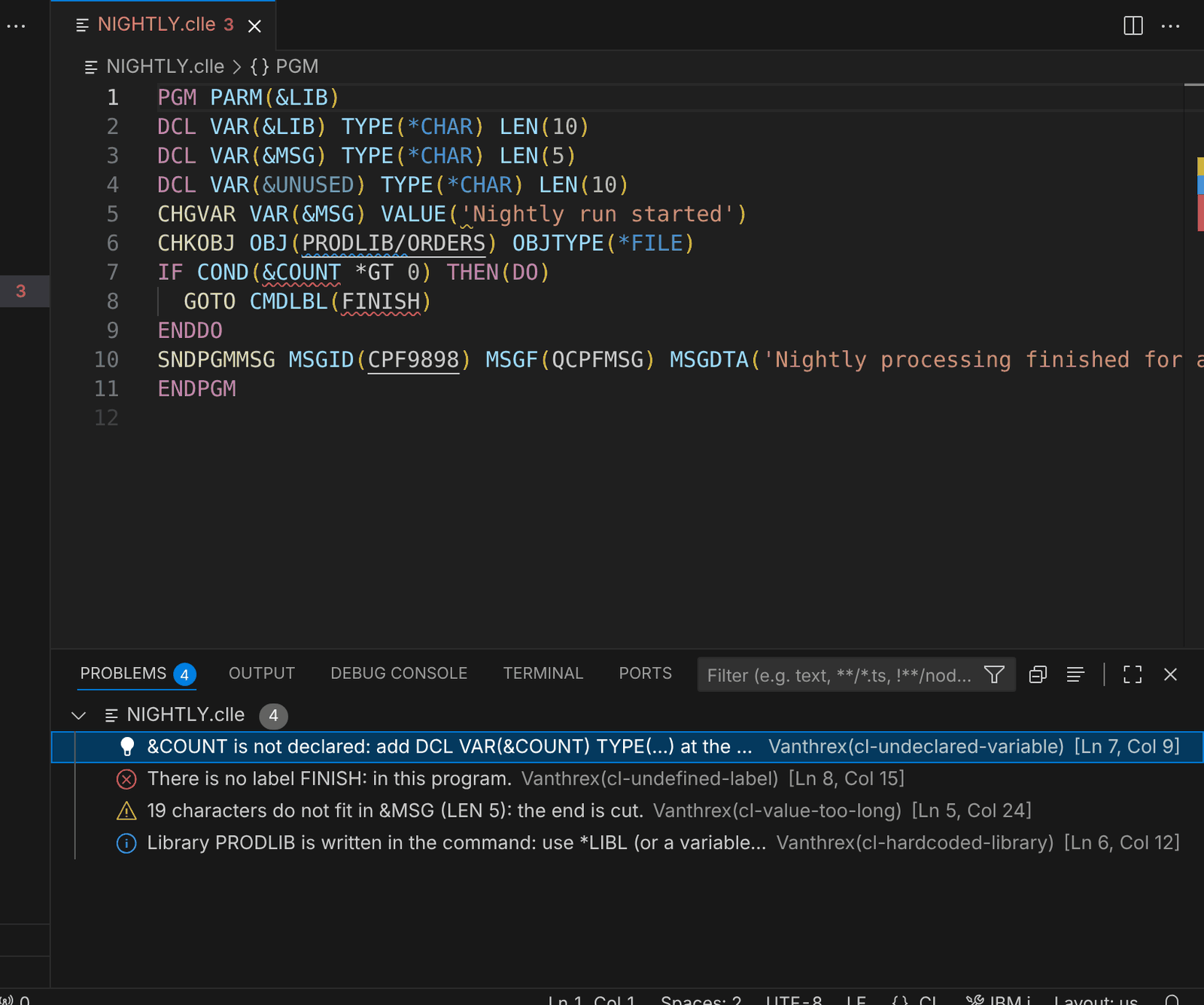 CL checks in the Problems view.
What you see: a variable used but not declared (&COUNT), a GOTO to a label that does not exist, a value longer than its variable and a hard-coded library. The light bulb on &COUNT declares it for you.
CL: Format Document
Press Shift+Alt+F (new in 3.1).
Show MONTHEND.clle
PGM PARM(&LIB)
DCL VAR(&LIB) TYPE(*CHAR) LEN(10)
DCL VAR(&COUNT) TYPE(*DEC) LEN(5 0)
START: CHKOBJ OBJ(&LIB/ORDERS) OBJTYPE(*FILE)
MONMSG MSGID(CPF9801) EXEC(GOTO CMDLBL(END))
CPYF FROMFILE(&LIB/ORDERS) TOFILE(QTEMP/ORDERS) MBROPT(*REPLACE) CRTFILE(*YES) FMTOPT(*NOCHK)
CALL PGM(MONTHEND) PARM(&LIB &COUNT)
END: ENDPGM
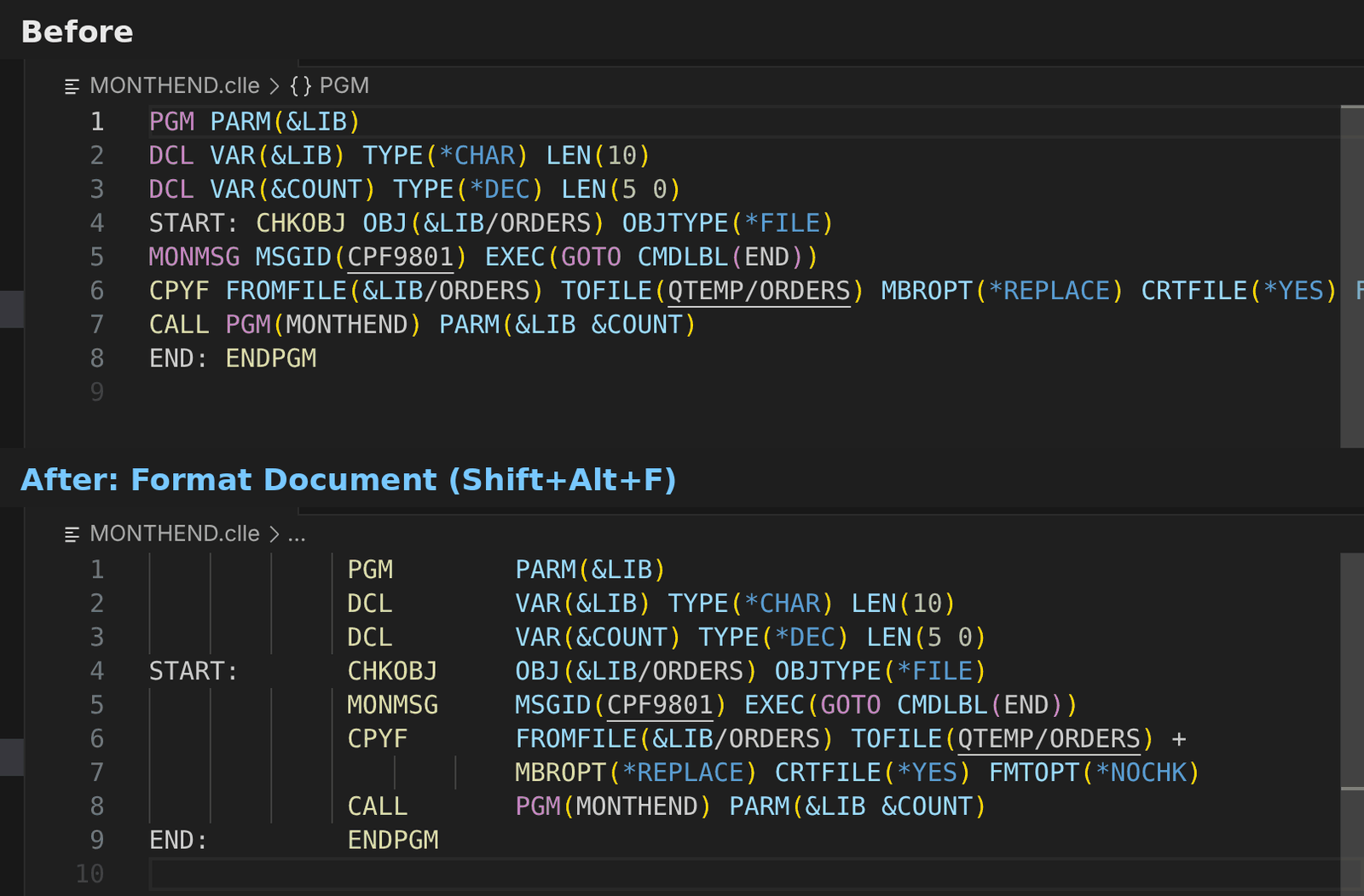 The prompter layout: labels, commands and parameters in their columns, long commands split with +.
What you see: labels in column 1, commands in column 14, parameters from column 25 and lines split with + before column 80.
SQL: checks before you run
A clean-up script.
Show cleanup.sql
-- Monthly clean-up
SELECT * FROM ORDERS WHERE STATUS = 'C';

DELETE FROM ORDERS;

UPDATE CUSTOMER SET REGION = 'EU' WHERE COUNTRY = NULL;

DROP TABLE OLD_ORDERS;
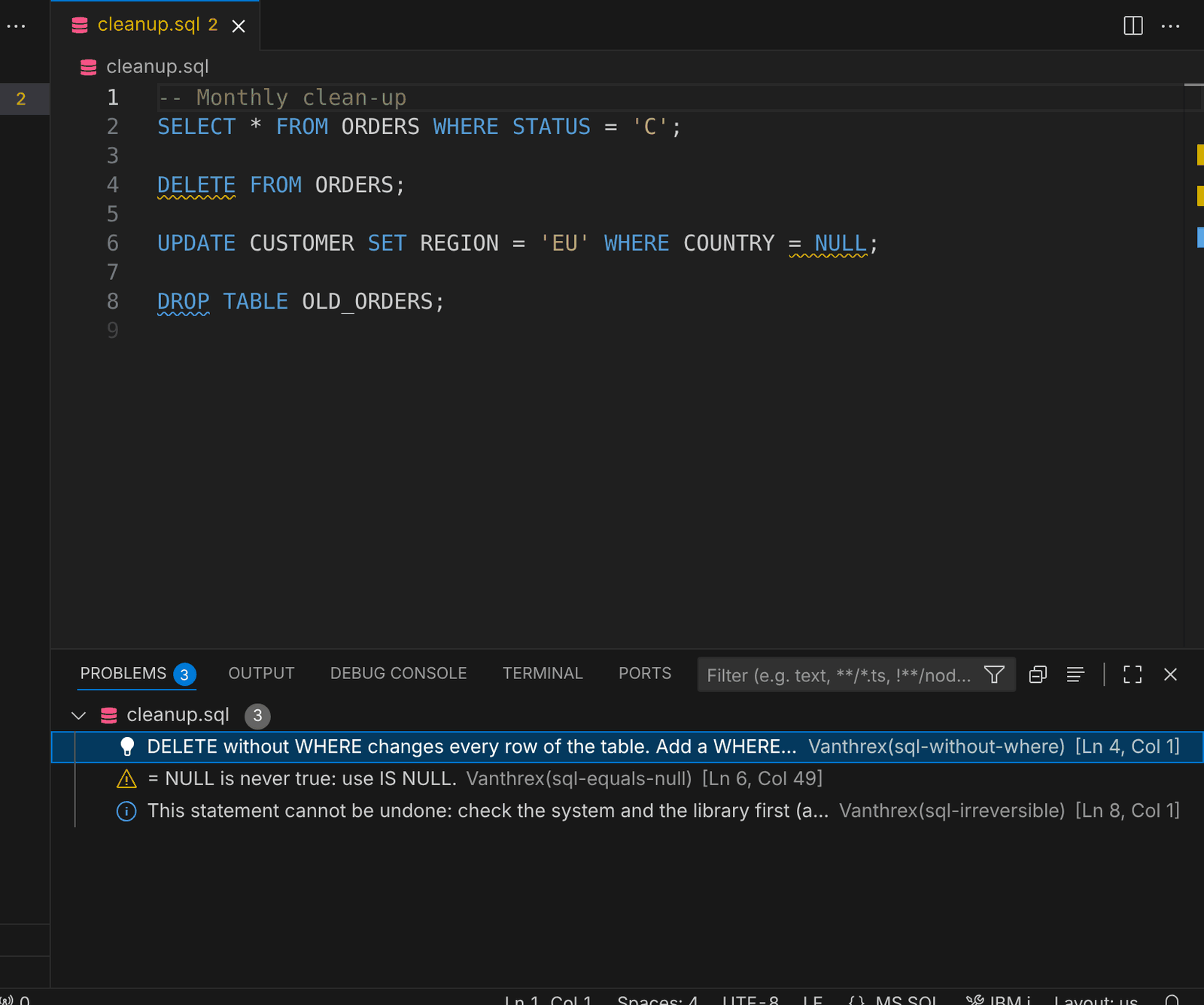 SQL checks before you run the script.
What you see: DELETE without WHERE (with a quick fix that adds WHERE 1 = 1 when every row is really meant), = NULL that is never true, and DROP TABLE, which cannot be undone.
DDS: checks while you type
A display file (new in 3.1).
Show CUSTDSP.dspf
     A                                      DSPSIZ(24 80 *DS3)
     A          R CUSTSCREEN
     A                                  1  2'Customer inquiry'
     A            CUSTNO         7Y 0B  3 20
     A            CUSTNAME      40A  O  3 24
     A            AMOUNT         5Y 7O  5 20
     A            NOTE               O  6 20
     A            COMMENT       30A  O  7 60
     A            CUSTNO         7Y 0O  9 20
     A          R CUSTSCREEN
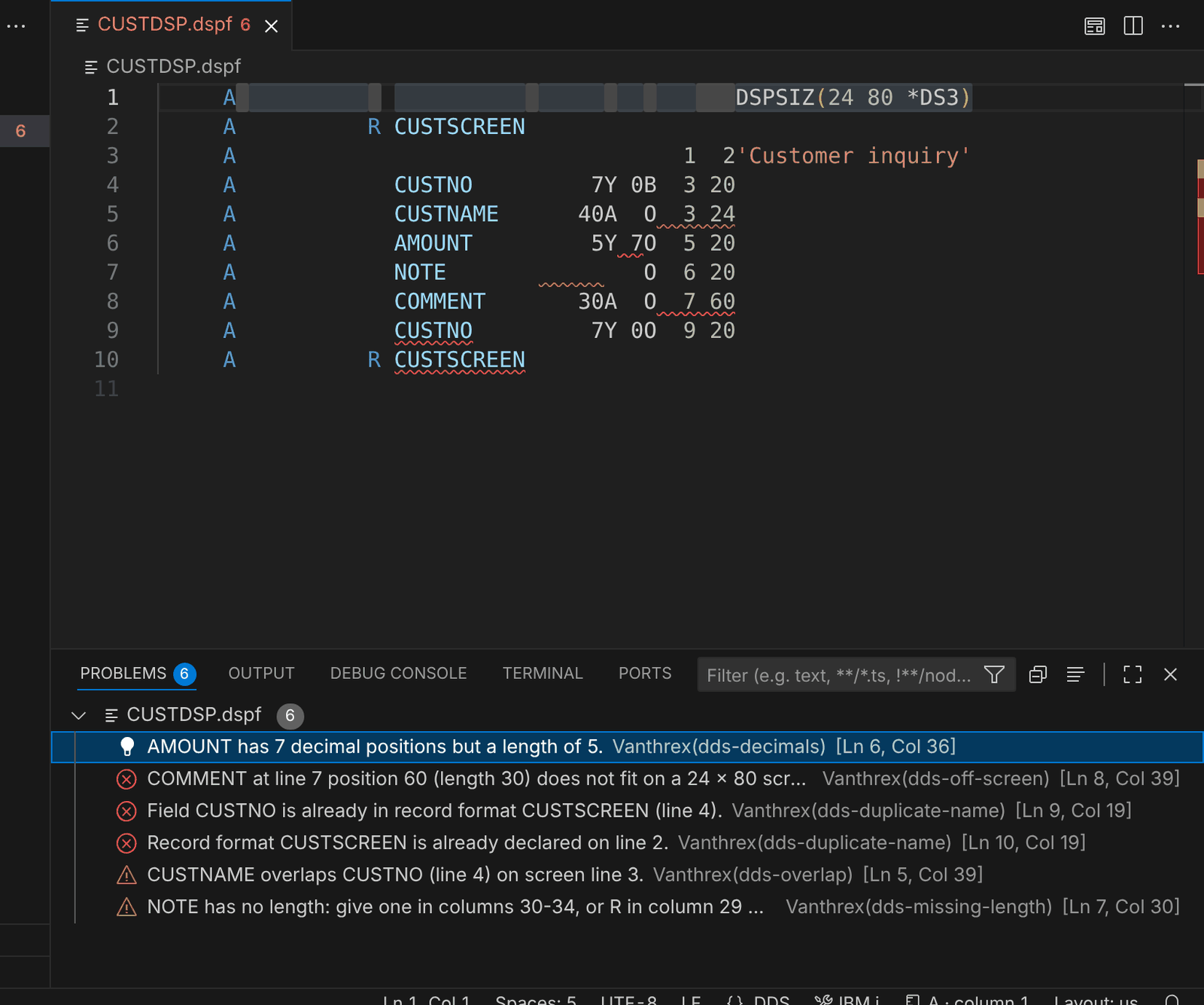 DDS checks in the Problems view.
What you see: more decimals than the length, a field outside the 24 × 80 screen, a field and a record format declared twice, two fields on top of each other and a field without a length.
Next
- Press
Ctrl+Alt+Ain any of these sources: the Developer Toolbox lists every tool that fits it. - Connect to your IBM i to compile, run SQL, browse libraries and much more.
- See all the screenshots.