AI with your data protected, several systems at once, database care, modernization, data quality, system audits, speed and a more flexible workflow — 60 new features.
Passwords (CL PASSWORD(…), pwd = …, constants named like a password), API keys, tokens, JWTs, private keys, credentials in URLs are replaced by placeholders (xxxx1…) before sending. The real values are put back only on your computer.
Queries the AI writes may not call HTTP, IFS-read, spooled-file, journal, data-queue or QCMDEXC functions, nor rename a sensitive column.
—
Links
Real values are never put back inside a link or URL of an answer, and only for what that request sent.
—
Libraries
Never read (wildcards like PAY*).
vanthrex.ai.deniedLibraries
Key files
IFS files that look like keys, certificates, credentials or system files, /QSYS.LIB paths and members of data files are refused.
—
Hidden instructions
System data is framed as data; the model is told never to obey it.
—
Changes
Queries are read-only and ask first; code changes are a diff you apply yourself.
vanthrex.ai.confirmQueries
See it: after each answer Vanthrex says how many values were hidden. AI: Privacy and Security shows the settings, the counts and every request (time, system, feature, size — never the content). AI: Preview What the AI Sees compares the open file with what would be sent. The audit trail is also written to the Vanthrex AI Audit output and a file (vanthrex.ai.audit).
New AI features
Feature
How
Change the selected code
Ctrl+Alt+E: describe the change; the proposal opens as a diff; Apply or not.
✨ links above procedures
Explain · Document · Tests for one procedure or subroutine (vanthrex.ai.codeLens).
/tune
Faster SQL with table sizes, indexes and index advice; CREATE INDEX proposals.
/sqlio
Native file I/O to embedded SQL.
/changes
Review only your changes (Git HEAD, unsaved changes, or the latest source-date day).
/cl
CL from a description, with the real command definitions.
/data LIB/TABLE
Invented test data that respects types and keys — structure only.
/health
What needs attention on the system now.
/security LIB/OBJ
Authority review with the commands to fix each finding.
Run SQL on Several Systems… / Run CL Command on Several Systems… (Connections toolbar): rows not on every system first, errors per system.
IBM i Project
Right-click a folder → Create IBM i Project: iproj.json, .ibmi.json, Rules.mk with targets and /COPY dependencies (Bob naming).
Library documentation
Right-click a library → Document This Library (Markdown): objects, programs and what they use, files and columns, CRUD matrix, Mermaid diagram.
CRUD matrix
Right-click a library → CRUD Matrix; Save as CSV.
Sources, reports and jobs
Feature
How
RPG for a display file
Right-click a .dspf → Generate RPG Program for This Display File: WORKSTN with SFILE / INDDS, EXFMT loop, function keys, subfile clear / load / display / READC.
Problem characters
Underlined in sources; the light bulb fixes them (vanthrex.editor.checkCharacters).
TODO notes
TODO and FIXME Notes in Open Sources…
Report to CSV
Right-click a spooled file → Report to CSV (Excel)… (vanthrex.csvSeparator).
Job run history
Job Run History…: elapsed and CPU of each run from QHST, slow and failed runs marked (vanthrex.jobHistoryDays).
Message in job logs
Find a Message in Job Logs… across a user’s recent jobs.
Database care and SQL generators
Feature
How
Unused indexes
Right-click a library → Unused Indexes of a Library…: not used by a query and not opened for 180 days (vanthrex.unusedIndexDays); unique and constraint indexes never proposed; Drop… asks first.
Journal coverage
Right-click a library → Journal Coverage of a Library…: files not journaled in red, STRJRNPF commands reviewed, then run on confirmation.
Level check finder
Right-click a file → Programs That Would Get a Level Check…: programs to recompile before they end with CPF4131.
Library snapshots
Take a Library Snapshot / Compare Library With Snapshot…: objects added, changed or removed since (kept on this computer, never data).
Table from CSV
Right-click a .csv / .xlsx → Create Table From CSV or Excel File…: types guessed, LABEL ON, Create and Import.
JSON_TABLE
Right-click a .json or select JSON → JSON_TABLE Query From a JSON Sample: typed columns, NESTED PATH for arrays.
Spooled file search
Find a Text in Spooled Files… (vanthrex.spoolSearchDays), one click to open.
Triggers
Schema browser → trigger → Enable / Disable this trigger.
Comment folding
Three or more comment lines fold in RPG and CL.
Modernize and understand code
Feature
How
Flowchart
Right-click an RPG or CL source → Flowchart of This Procedure: main line, procedure or subroutine; click a box to go to its line; Copy as Mermaid.
Matching blocks
Cursor on IF / ELSE / DOW / WHEN / MONITOR / END highlights the block; Ctrl+Shift+\ jumps (vanthrex.editor.matchBlocks).
SQL procedure over a program
Create SQL Procedure for This Program…: CREATE PROCEDURE / FUNCTION … EXTERNAL NAME.
DDS to SQL
Convert DDS to SQL: CREATE TABLE … RCDFMT, CREATE INDEX … RCDFMT … ADD, views for select / omit.
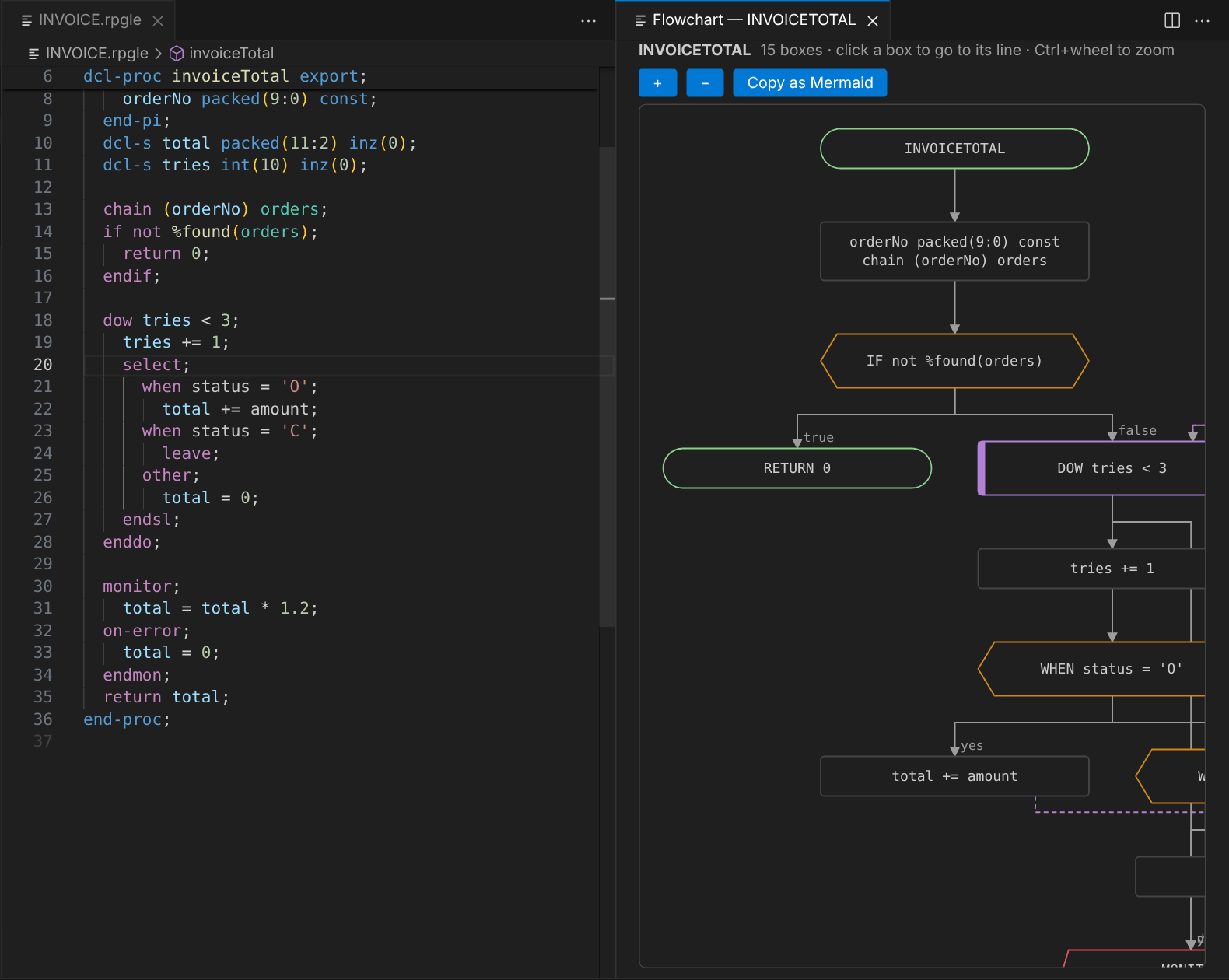 Flowchart of a procedure: click a box to go to its line, or copy it as Mermaid.