New in 3.0
Everything for IBM i development in one extension: AS/400 GO menus, import from Code for IBM i, team setup, team coding standards and a code health report for whole libraries.
- AS/400 menus and green-screen commands
- Everything in Vanthrex, for one person or a whole team
- Marketplace and README
- Where to find it
AS/400 menus and green-screen commands
- GO menus, AS/400 style (
GO MAIN,GO PROGRAMMER,GO SYSTEM,GO FILE,GO USER,GO CMN,GO SECURITY,GO PROBLEM; Ctrl+Alt+Shift+M, the quick menu, or typeGOon the command line): the IBM i menus with their option numbers. Type a number, any command, orGO <menu>on the Selection or command line; Back works like F12. - Work with My Jobs: the active jobs of the signed-on user.
- GO RPG — RPG Development menu: 28 RPG tools in one place (compile, code checks, fixed → free, subroutine → procedure, prototypes, binder source, flowchart, DS layout, RPGUnit, debug, where used…), open first in the AS/400 Menus view.
- Favorites and Recent in the AS/400 Menus view: star any option or command (inline button or right-click); the last 8 you used are listed at the top.
- Reliable clicks: tools that work on the open source now say “Open an RPG source first” (with Find a Member…) instead of silently doing nothing; the view is built in memory, so it opens instantly and keeps what is expanded.
- AS/400 Menus view in the side bar: every GO menu with its numbered options, and all 5250 commands that open a screen, A to Z by area (jobs, database, objects, security…). Click to open; right-click or the inline button to prompt the command on the command line (F4).
- About 30 more green-screen commands on the 5250-style command line open the matching screen:
DSPPFM,UPDDTA/STRDFU,STRQRY/WRKQRY,WRKDTAQ,WRKDTAARA,EDTDTAARA,WRKMSGF/WRKMSGD,WRKBNDDIR,STRDBG,WRKJRN,DSPJRN,WRKAUTL,EDTOBJAUT,DSPLOG,WRKPTF,WRKSYSACT,EDTLIBL,WRKLNK,WRKLIB,WRKF/WRKPGM/WRKSRVPGM/WRKMOD/WRKCMD,SIGNOFFandGO.
Everything in Vanthrex, for one person or a whole team
- Import My Code for IBM i Setup: connections (host, port, user, SSH key), library lists, current library, home folder, library list profiles (as Vanthrex library list sets) and compile actions (variables such as
&OPENLIB,&OPENSPF,&OPENMBR,&BUILDLIBconverted), from your Code for IBM i settings and the workspace.vscode/actions.json. You choose what to import; passwords are never read — you type each one at the first connection. Both extensions can stay installed while you try Vanthrex. - Team setup file: export the connections (without user names, passwords or key paths), library list sets, CL macros, compile actions, checks, team standards and AI privacy settings to one JSON file; colleagues import it, type their user profile once, and work with the same setup.
- Team coding standards (
vanthrex.standards, all off until chosen): constants in upper case, names written as declared, QUALIFIED data structures, no globals in procedures, no global or local subroutines, no OCCURS or CTDATA, no SQL joins or EXECUTE IMMEDIATE in programs, a description above each procedure, conditions in parentheses, indentation, prototypes with EXTPGM / EXTPROC, directive case, a naming pattern and a procedure size limit — checked while you type. Import Coding Standards from rpglint.json reads the rules a team already uses with Code for IBM i. - Code Health Report of a Library: every Vanthrex check (RPG, CL, SQL and your standards) on every indexed member of a library — or all of them — in seconds and offline: a score and grade, the members to look at first (click to open), and the findings by check, with CSV and Excel export. Run it before a release and compare after.
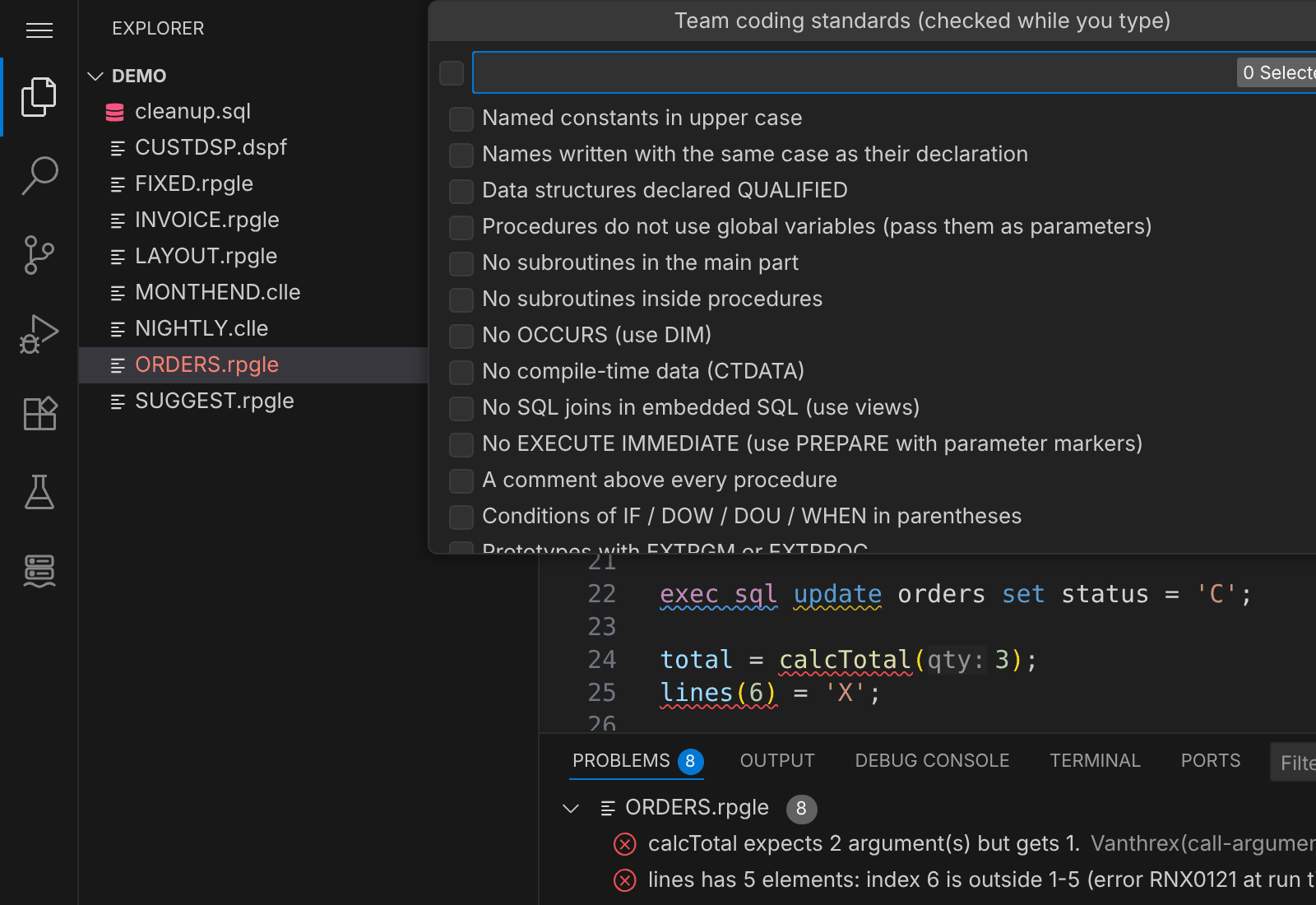 Team coding standards: tick the rules your team follows, they are checked while you type.
Marketplace and README
- Marketplace listing: clearer name (Vanthrex – IBM i Development Tools (RPG, CL, SQL)) and description, 30 search keywords (IBM i, AS400, iSeries, RPGLE, ILE RPG, SQLRPGLE, CL, Db2 for i, IFS, DSPPGMREF, F4 prompt, PDM, SEU, fixed to free…) and the Linters, Formatters and Notebooks categories.
- README rewritten for new visitors: install and connect in three steps (with
code --install-extension gauravgupta0612.vanthrex-ibmi), why teams use it, what you can do by task, who it is for, the new shortcuts, and where to get help; the full feature table by version stays below.
Where to find it
| What | How |
|---|---|
| GO menus | Ctrl+Alt+Shift+M, the quick menu, or GO on the command line (Ctrl+Alt+K) |
| AS/400 Menus view | The Vanthrex side bar, when connected |
| Import from Code for IBM i | Command Palette → Import My Code for IBM i Setup…, or Ctrl+Alt+A → Setup |
| Team setup file | Export a Team Setup File… / Import a Team Setup File… |
| Team coding standards | Team Coding Standards… or Import Coding Standards from rpglint.json… |
| Code health report | Code Health Report of a Library… (index the library first) |
Upgrading from 2.x needs nothing: settings, connections and passwords stay as they are. See also what was new in 2.6.