New in 3.1
More power in the editor: DDS checks, CL formatting, RPG semantic highlighting, names edited together, END lines indented as you type, links to a line and clickable terminal output.
What is new
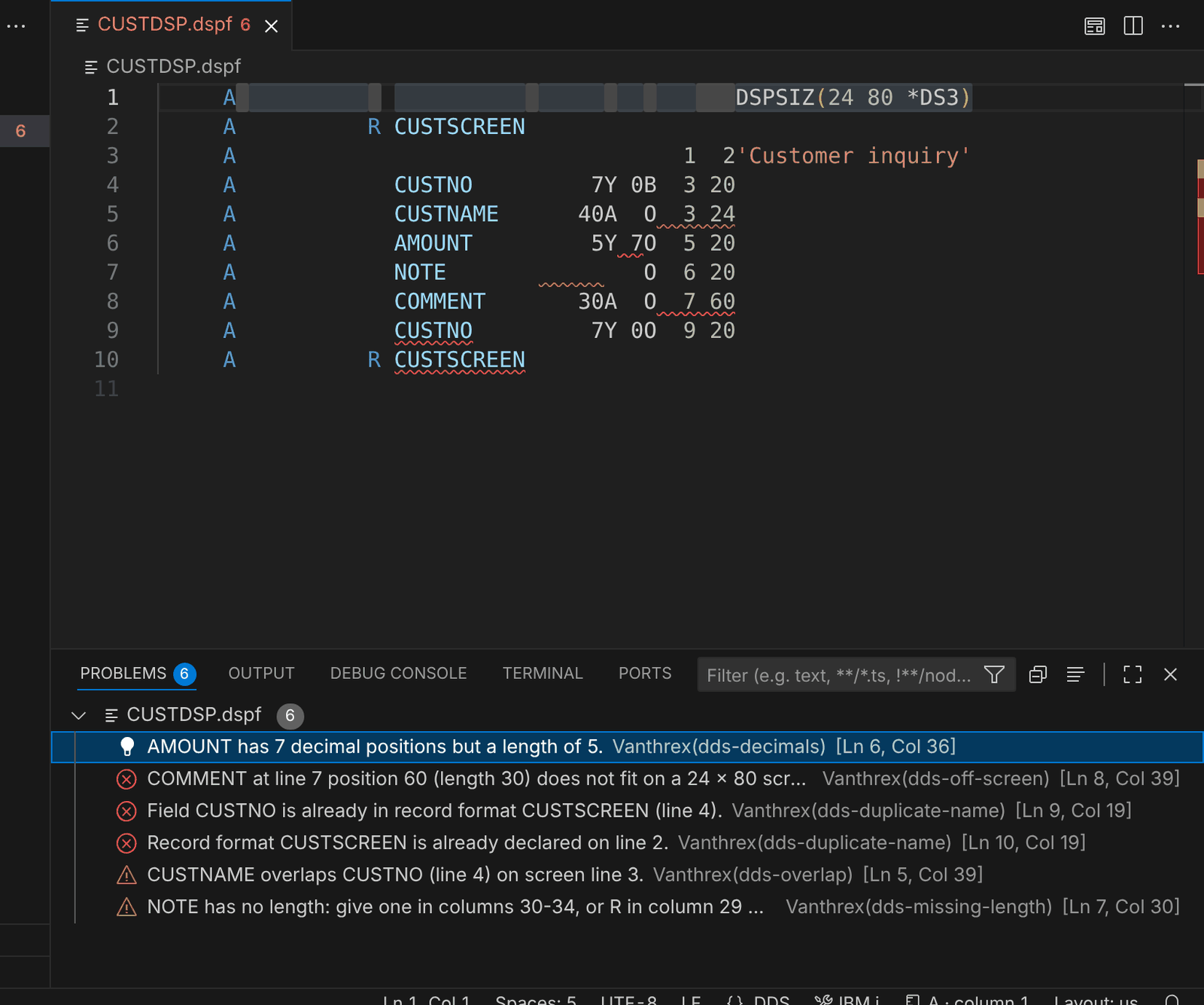 DDS checks while you type: decimals, fields outside the screen, names declared twice, overlapping fields, missing lengths.
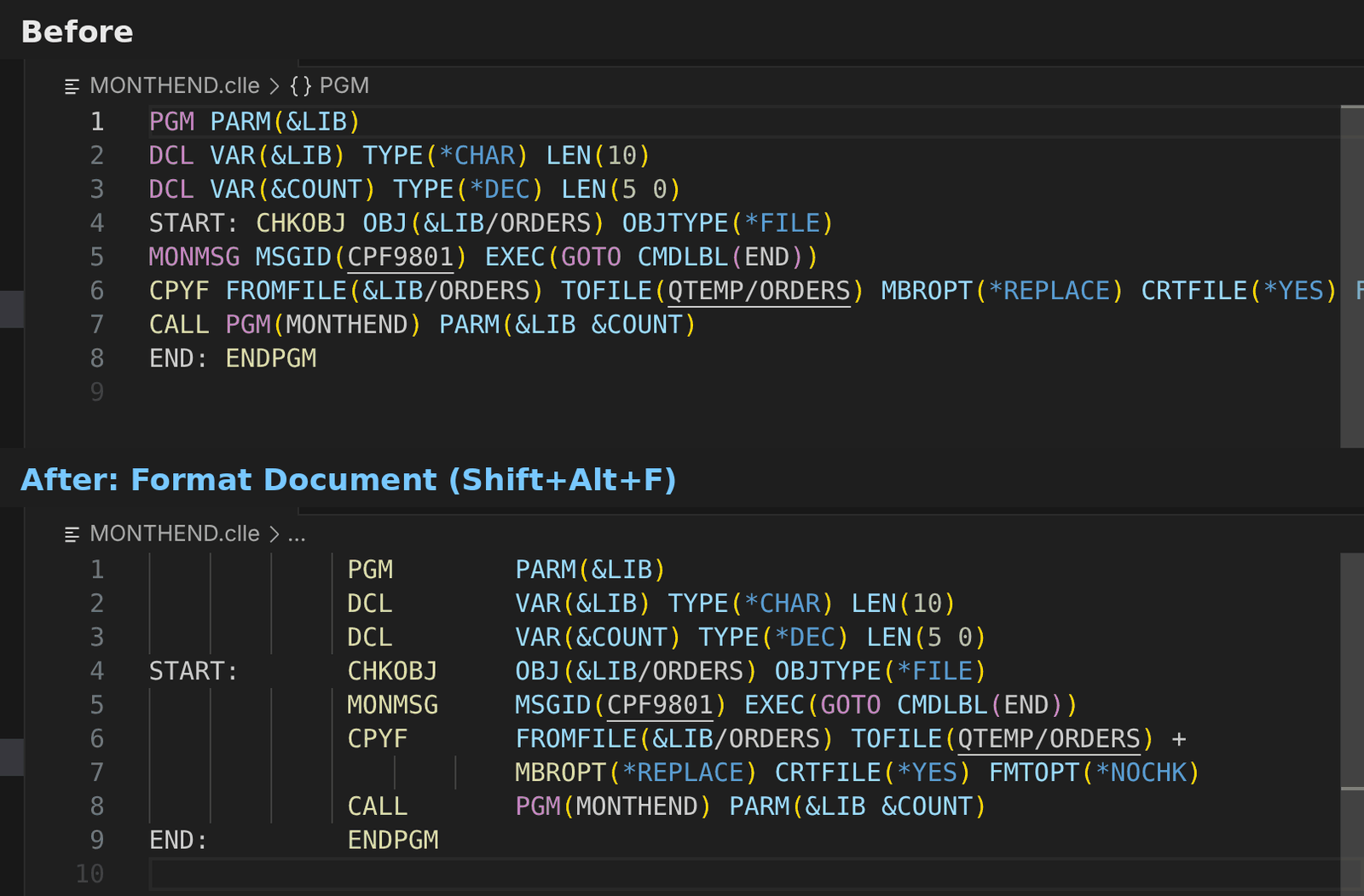 Format Document for CL puts labels, commands and parameters in the prompter columns and splits long commands with +.
- DDS checks while you type (PF, LF, DSPF, PRTF;
vanthrex.lint.dds): names longer than 10 characters, a field or record format declared twice, fields with no length (and no reference), more decimals than the length, lengths beyond the data type, key fields that are not in the record, display fields or constants outside the screen (DSPSIZ, *DS3 / *DS4) and display fields on top of each other. Reference fields, logical files and conditioned fields are left alone. DDS members are part of the Code Health Report too. - Format Document for CL (Shift+Alt+F): the prompter layout — labels in column 1, commands in column 14, parameters from column 25, long commands split with
+before column 80. Statements with a comment inside are kept as they are. - RPG semantic highlighting (
vanthrex.editor.semanticHighlighting): parameters, constants and CONST parameters (read-only), data structures and subfields, procedures, files and subroutines each get their own colour, and a global variable used inside a procedure is marked — on top of the existing syntax colours. - Names edited together: renaming a procedure or a data structure on its
DCL-PROC/DCL-DSline changes the name on itsEND-PROC/END-DSline at the same time, and the other way round. - END lines indented as you type (
vanthrex.editor.indentOnType): typing the;of ENDIF, ENDDO, ELSE, WHEN, OTHER, ON-ERROR, END-PROC… moves the line under its opener. - Links that open a member at a line: Copy a Link That Opens This Line (right-click, or Ctrl+Alt+A → Copy) gives a
vscode://…link for tickets, chats and e-mails; whoever clicks it, with Vanthrex installed, opens the same member (or IFS file) at the same line, on the named system after a confirmation. - Clickable IBM i references in every terminal (
vanthrex.editor.terminalLinks):LIB/FILE(MEMBER)opens the member, message IDs such asCPF9801orMCH1210are explained, IFS paths open the file — in the PASE terminal, build output, and any other terminal.
Settings
| Setting | Default | What it does |
|---|---|---|
vanthrex.lint.dds | on | DDS checks while you type |
vanthrex.editor.semanticHighlighting | on | RPG names coloured by what they are |
vanthrex.editor.indentOnType | on | END / ELSE / WHEN lines moved under their opener |
vanthrex.editor.terminalLinks | on | Members, message IDs and IFS paths clickable in terminals |
Each DDS check can also be turned off in vanthrex.lint.rules.
Examples
DDS checks while you type
Physical, logical, display and printer files are checked as you type; each finding names its rule, so you can turn it off.
A DSPSIZ(24 80 *DS3) A R CUSTSCREEN A CUSTNO 7Y 0B 3 20 A CUSTNAME 40A O 3 24 A AMOUNT 5Y 7O 5 20 A COMMENT 30A O 7 60
Problems
!CUSTNAME overlaps CUSTNO (line 4) on screen line 3.dds-overlap
✕AMOUNT has 7 decimal positions but a length of 5.dds-decimals
✕COMMENT at line 7 position 60 (length 30) does not fit on a 24 × 80 screen.dds-off-screen
Format Document for CL
Press Shift+Alt+F: labels, commands and parameters go to the prompter columns and long commands are split with +.
Before
PGM PARM(&LIB)DCL VAR(&LIB) TYPE(*CHAR) LEN(10)START: CHKOBJ OBJ(&LIB/ORDERS) OBJTYPE(*FILE)MONMSG MSGID(CPF9801) EXEC(GOTO CMDLBL(END))CPYF FROMFILE(&LIB/ORDERS) TOFILE(QTEMP/ORDERS) MBROPT(*REPLACE) CRTFILE(*YES)END: ENDPGM
After
PGM PARM(&LIB) DCL VAR(&LIB) TYPE(*CHAR) LEN(10)START: CHKOBJ OBJ(&LIB/ORDERS) OBJTYPE(*FILE) MONMSG MSGID(CPF9801) EXEC(GOTO CMDLBL(END)) CPYF FROMFILE(&LIB/ORDERS) TOFILE(QTEMP/ORDERS) + MBROPT(*REPLACE) CRTFILE(*YES)END: ENDPGM